Many device makers who ask us about an Android upgrade face the same problem. Google has stopped patching the Android version their product runs on, while the devices are expected to stay in the field for years.
Device makers in this situation have four options for keeping their devices secure until the end of their service life. Which option works depends mostly on the chip vendor's BSP and on how many years the devices still have to run.
Google patches Android versions for under five years
Google fixes security issues in Android every month and lists them in the Android Security Bulletin. Each bulletin covers only the most recent Android versions. When a version drops off that list, Google ships no more fixes for it. This is what end of life means for Android: the devices keep working, but every vulnerability found after that date stays open for attackers to use.
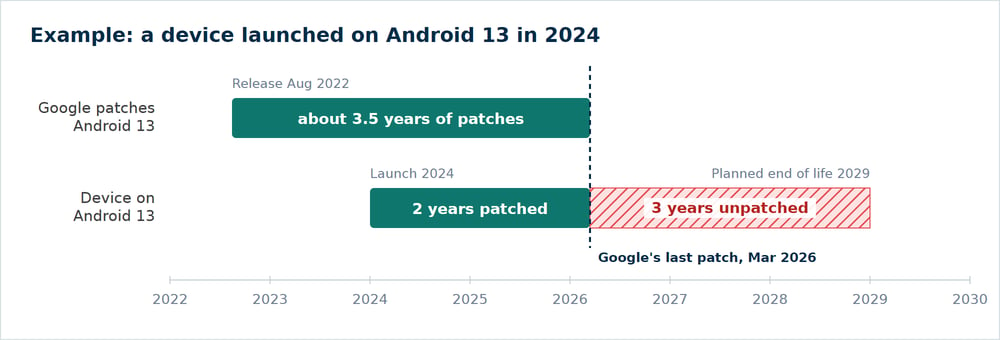
Android 13 was released in August 2022, and Google shipped its last security patches for it in March 2026, about three and a half years later.
A kiosk that launched on Android 13 in 2024, which was a common choice at the time, received only about two years of patches from Google. If the kiosk is meant to stay in service until 2029, it runs without security patches for more than half of its service life.
The BSP from the chip vendor often runs out even earlier. In our experience, chip vendors build BSPs for the Android versions that are current when a chip comes out, and they rarely port them to Android versions released years later.
The CRA requires device makers to know the vulnerabilities in their devices
For devices sold in the EU, the Cyber Resilience Act (CRA) turns missing security updates into a legal problem. Since 11 September 2026, manufacturers have to report actively exploited vulnerabilities in their products within 24 hours to their national CSIRT (computer security incident response team) and to ENISA, the EU cybersecurity agency. The duty also covers devices that were sold several years before.
A manufacturer can only report a vulnerability in time if it already knows that the vulnerability exists in its devices. For this reason, the CRA also requires manufacturers to know about vulnerabilities before anyone exploits them. From 11 December 2027, new devices need an SBOM (a list of all software components in the product), and manufacturers have to track known vulnerabilities in those components and fix them without delay during a support period of, as a rule, at least five years.
For an Android device, this means analyzing the BSP and monitoring the CVE database, the public list of known vulnerabilities, for every component in the BSP, from the Linux kernel to the vendor's drivers. For a BSP that comes from a third party, this work is very difficult, because the device maker often lacks the source code, the change history or the know-how to judge whether a CVE affects its devices.
Many device makers rely on their hardware supplier (OEM) for this work. Under the CRA, however, the risk stays with the manufacturer who places the device on the market. If the OEM can't prove which vulnerabilities it has checked and fixed, the manufacturer carries the legal risk for vulnerabilities that nobody has checked.
The reporting duties and deadlines are covered in more detail in our article CRA reporting: what Android device makers need today.
Four options keep devices secure after end of life
When the Android version on their devices reaches end of life, device makers can choose between four options, which differ in effort and in how many years of support they add:
- Keeping the OS unchanged.
- Backporting security fixes to the old Android version.
- Upgrading the devices to a newer Android version.
- Replacing the devices with a new hardware generation.
An unchanged OS leaves even offline devices exposed
Keeping the OS unchanged costs nothing at first, but the devices collect more known vulnerabilities every month. Most devices we see in the field are connected to a network in some way, even if it's only to send data home or to receive updates.
Devices that never go online are exposed as well, because attackers can reach them through local interfaces:
- Wi-Fi and Bluetooth can be attacked by anyone within radio range, even if the device itself never connects to the internet.
- USB ports accept sticks and cables from anyone who can physically reach the device.
- Media files can carry attacks too. A digital signage screen plays videos and images supplied by customers or agencies, and a single manipulated file can exploit a flaw in Android's media framework. The Stagefright vulnerabilities from 2015 attacked Android devices in exactly this way.
Keeping the OS unchanged therefore only fits devices without radios, without accessible ports and without content from outside, which rules out most products we see.
Backporting buys time at a cost that keeps rising
For backporting, a developer takes each security fix released for newer Android versions and adapts it to the old version on the device. In the first months, the effort is manageable. With every release, however, the code of the old and new versions drifts further apart, so each fix takes more work and more testing. Backporting fits devices with only a few years of service left, or works as a bridge until an upgrade is ready.
An upgrade gives the devices a new support period
We recommend an upgrade whenever the hardware allows it. Most of the work sits in the BSP, because the drivers and HALs (the layers between Android and the hardware) have to run with the newer Android version and the kernel it needs. Once the BSP runs on the new version, keeping the devices patched becomes routine again.
An upgrade doesn't have to go one Android version at a time. Skipping versions and going straight to a recent one gives the devices the longest support period. We recently upgraded a device in the field from Android 7 straight to Android 14.
New hardware fits when the chip has no path forward
If no BSP for a newer Android version exists for the chip and porting one isn't worth the effort, the next step is a new product generation. From December 2027, a new device needs the CE marking under the CRA from the first unit sold, so the Android version and BSP chosen for it decide how long the device can be supported.
The BSP and its supplier decide which option fits
Before choosing an option, device makers should check these points for each product line:
- Whether the chip vendor offers a BSP for a newer Android version, or how much work a port would be.
- Which kernel the newer Android version needs, and whether the drivers run on it.
- Whether RAM and storage leave room for a newer Android version, since newer versions usually need more of both.
- How the new version reaches the devices. Some upgrades change the partition layout and need either a carefully prepared OTA update or a one-time reflash of the devices.
- How the device maker's own apps behave on the new version, since every Android version changes the rules for permissions and background work.
- How many devices are in the field, and how many years of service each device has left.
The size of the fleet and its remaining years often settle the decision. An upgrade pays off for a large fleet with years to go, while backporting can cost less for a small fleet that retires soon.
When the BSP comes from a hardware supplier, device makers should also ask the supplier for proof that the known vulnerabilities in the BSP are handled:
- An SBOM that lists every component in the BSP with its version.
- A list of all CVEs that affect the BSP, each one marked as fixed, still open or not affected.
- The security patch level of each release, and how often the supplier ships new releases.
- Access to the source code, or the results of a source code audit.
- A written commitment to a support period, with an end date.
A supplier that can't provide this proof leaves the device maker with the risk under the CRA and with no way to show that the risk is handled.
Upgrades are best planned before a product launches
The best time to plan for end of life is before a product launches. Device makers should pick the newest Android version their BSP supports and plan from day one how the devices will move to the next version.
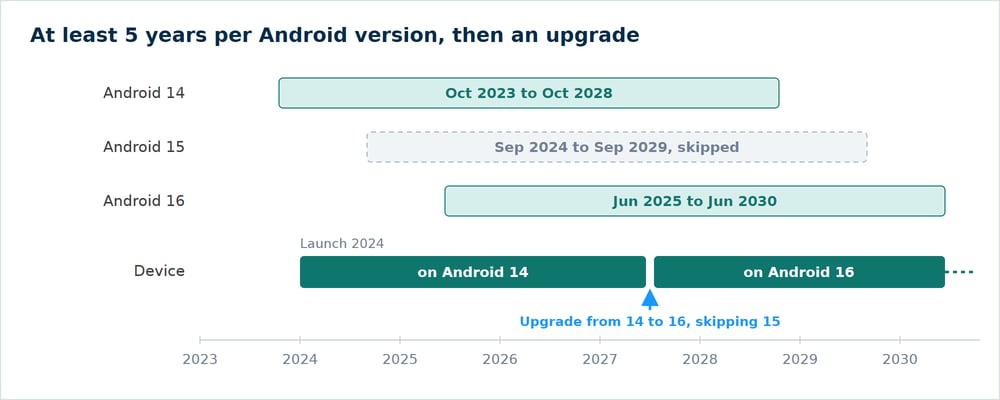
This is how our long-term support works. Each major Android version gets at least five years of security updates from its release, included in the contract. For Android 16, which was released in June 2025, this means security updates until at least June 2030. Before that support period ends, we upgrade the devices to a newer Android version, so the product stays supported for its whole service life. Device makers who need to stay on one Android version for longer can agree on a longer period in their contract, depending on the BSP.
In the example below, a device launched on Android 14 in 2024 skips Android 15 and is upgraded straight to Android 16, which keeps it supported until June 2030.
Emteria automates the routine work behind each Android version
We build and maintain custom Android OS for device makers, from the BSP to OTA updates. Keeping devices secure takes more than building images: someone has to monitor the CVE database, maintain the SBOM tooling and keep the builds reproducible. We've automated as much of this work as we can, so the device maker's team reviews and approves releases instead of doing the routine work by hand:
- Automated OS pipelines in the Emteria Hub build every Android version for a device in the same repeatable way.
- Reproducible builds make every release traceable to its exact sources.
- Every release comes with an SBOM, the parts list of the OS.
- We monitor the CVE database for the components in each SBOM and check which of the vulnerabilities affect the devices.
- Images and updates are signed with the device maker's own keys.
- OTA updates ship security patches to test devices first, then to all devices in the fleet.
- Our CRA support helps device makers meet their CRA obligations on the OS side.
Talk to us about devices that run an Android version Google no longer patches. With the chip, the Android version and the number of devices in the field, we can tell which option fits and what it takes.
Build unique products, boost device performance
See why Emteria is the chosen Android™ customization & management platform for OEM solution builders, and what it can do for your team and customers.