


In our current Android implementation, both Raspberry Pi 4 and the Raspberry Pi 5 report an available hardware-accelerated HEVC decoder to the system. This single flag hides three separate limits: how large one stream can be, how many streams fit on screen at the same time, and what the device does once you cross that point. We measured all three on both boards. The two boards accelerate different codecs, they respond to added video zones in different ways, and a signage layout running cleanly on one of them can stop decoding on the other.
This post continues with our performance series by covering the media stack. Our earlier articles covered a kernel flag capping SD card throughput, impact by shipping precompiled system apps, and scroll performance on an NXP i.MX8M Plus board.
How we measured
All figures below come from a Raspberry Pi 4 (Broadcom BCM2711, four Cortex-A72 cores at 1.5 GHz) and a Raspberry Pi 5 (Broadcom BCM2712, four Cortex-A76 cores at 2.4 GHz), each with 4 GB of RAM, running Android 17. The display was an 800x480 DSI panel, the official Raspberry Pi touchscreen, with HDMI disconnected. CPU figures are for the codec service, and dropped-frame percentages come from the decoder itself.
Because the panel is 800x480, the multi-zone results below measure what the decoder can decode, and they do not include the composition and scaling cost of putting those zones onto a large HDMI screen. On a 4K display, expect the decode ceilings below to be an upper bound rather than a budget you can spend in full.
These figures describe how Android decodes video on these boards in our build. Several of the limits are decisions in the Android media stack rather than properties of the silicon. Which codec gets a hardware path, whether a software decoder exists to fall back on, and what happens when a decode request exceeds a declared ceiling are all set by the codec configuration, the Codec2 components and the kernel drivers in a given build. A different Android build on the same board could add further improvements in future.
The two boards accelerate different codecs
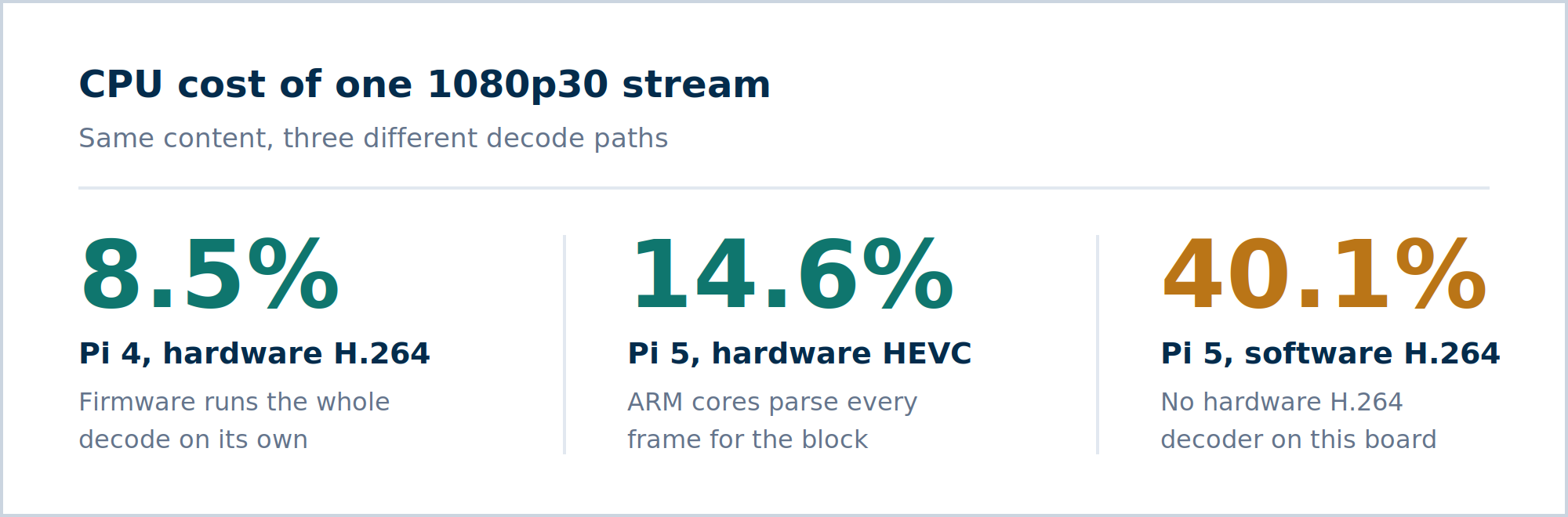
On the Raspberry Pi 4, H.264 goes through the Codec2 component c2.v4l2.avc.decoder and decodes 1080p30 at 8.5% CPU. That path has a ceiling declared at 1080p60 in Android's codec configuration, and above it the decode fails outright, because our build ships no software H.264 decoder on this board to fall back on. That absence is a configuration choice in the Android OS build rather than a limit of the board. HEVC on the same board goes through c2.ffmpeg.hevc.decoder and costs 52.3% CPU for the same 1080p30 content, six times more than H.264.
The table below shows single-stream cost on the Raspberry Pi 4 at 30 fps.
| Codec2 component | Resolution | CPU | Result |
| c2.v4l2.avc.decoder | 1920x1080 | 8.5% | clean, 0% dropped |
| c2.v4l2.avc.decoder | 3840x1080 | - | fails, no software fallback (*) |
| c2.ffmpeg.hevc.decoder | 1920x1080 | 52.3% | clean, 0% dropped |
| c2.ffmpeg.hevc.decoder | 3840x1080 | 91% | 84% of frames dropped |
(*) Android's codec configuration on this platform declares a 1080p60 ceiling for the hardware H.264 path, and no software H.264 decoder is present to take over above it. Both are properties of the Android media stack rather than of the board.
The Raspberry Pi 5 makes the opposite choice. It has no hardware H.264 decoder at all, so H.264 runs in software through c2.ffmpeg.h264.decoder and its cost follows the bitrate. HEVC has hardware support and stays close to flat.
The table below shows single-stream cost on the Raspberry Pi 5 at 30 fps. All rows dropped 0% of frames.
| Codec2 component | Resolution | Bitrate | Path | CPU |
| c2.ffmpeg.h264.decoder | 1920x1080 | 10.4 Mbps | software | 40.1% |
| c2.ffmpeg.hevc.decoder | 1920x1080 | 2.1 Mbps | hardware | 14.6% |
| c2.ffmpeg.h264.decoder | 3840x1080 | 2.5 Mbps | software | 69.0% |
| c2.ffmpeg.h264.decoder | 3840x1080 | 10.3 Mbps | software | 101.0% |
| c2.ffmpeg.hevc.decoder | 3840x1080 | 2.5 Mbps | hardware | 35.4% |
| c2.ffmpeg.hevc.decoder | 3840x1080 | 10.3 Mbps | hardware | 36.8% |
The bitrate rows are the most interesting part. At 3840x1080, software H.264 climbs from 69.0% to 101.0% CPU across a four-fold bitrate spread, while hardware HEVC moves from 35.4% to 36.8% across the same spread. That gap separates a decoder whose cost is CPU work on the compressed data from one whose cost is the fixed handling around a hardware block.
Zone count moves the limit differently on each board
Single-stream numbers only describe one video on screen. Signage layouts may typically run several zones at once, and the two boards scale in opposite ways in this case.
On the Raspberry Pi 5, the limit is total pixel throughput: width x height x fps, summed across every zone on screen. Halving a zone's resolution roughly doubles how many zones fit, on either codec path, because the decoder responds to the size of the pixel budget rather than to how it is split up. Six zones at 1920x900 and three zones at 3200x1080 hit the same wall, since both land at about 311 Mpx/s.
The table below shows how many zones fit on a Raspberry Pi 5 at 30 fps. These figures are derived from the measured throughput ceilings, roughly 310 Mpx/s in hardware and 210 Mpx/s in software, rather than run as one test per cell.
| Zone resolution | Max zones, software H.264 | Max zones, hardware HEVC |
| 1920x1080 | 3 | 5 |
| 2560x1080 | 2 | 3 |
| 3840x1080 | 1 | 2 |
| 3840x2160 | 0 | 1 |
The Raspberry Pi 4 does not follow that rule. Across a fixed six-zone hardware H.264 layout, going from 640x360 to 960x540 per zone is 2.25 times the pixels, and it moved codec service CPU from 47.5% to 49.6%. On this board the cost tracks the number of open decoder instances, at roughly 8% CPU each, far more than the resolution of the video inside them.
The table below shows six hardware H.264 zones on a Raspberry Pi 4, all fed from one clip at 30 fps and sampled across at least one loop point.
| Zone resolution (x 6 zones) | Combined Mpx/s | Result |
| 640x360 | 41.5 | clean |
| 960x540 | 93.3 | clean |
| 1120x630 | 127.0 | clean, highest passing configuration |
| 1280x720 | 165.9 | decode failed, reboot required (*) |
(*) Decode did not resume on its own and the board needed a reboot. We have not isolated whether this originates in the Codec2 component, the V4L2 kernel driver or the firmware interface, so we describe it as behavior of the Android stack under test rather than a hardware fault.
The Pi 5 degrades before it fails, the Pi 4 does not
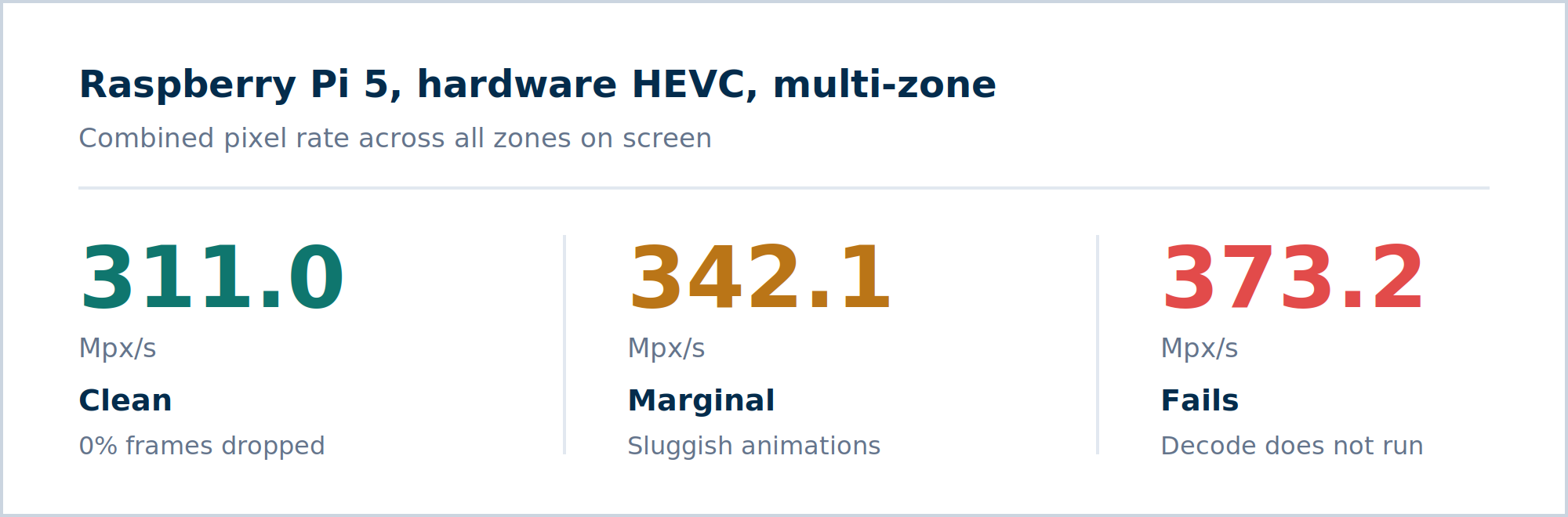
On the Raspberry Pi 5 there is a band between working and not working. Hardware HEVC ran clean at a combined 311.0 Mpx/s, still played at 342.1 Mpx/s with visibly sluggish artifacts, and failed at 373.2 Mpx/s. A product that lands in that middle band is shippable and bad, which is the harder case to catch in testing than an outright failure.
The table below shows multi-zone runs on the Raspberry Pi 5 at 30 fps, sampled over 30 second windows.
| Layout | Combined Mpx/s | Result |
| hardware HEVC | 311.0 | clean |
| hardware HEVC | 342.1 | marginal, sluggish artifacts |
| hardware HEVC | 373.2 | failed |
| mixed H.264 and HEVC | 297.2 | marginal |
| mixed H.264 and HEVC | 304.1 | clean |
| mixed H.264 and HEVC | 373.2 | failed |
| mixed H.264 and HEVC | 518.4 | failed |
Mixing codecs does not add the two budgets together
The software path tops out around 210 Mpx/s and the hardware path around 310 Mpx/s, so a layout that splits work between them looks like it should reach roughly 520 Mpx/s, but in reality it does not. The best mixed layout we measured passed at 304.1 Mpx/s, no better than pure hardware HEVC at 311.0. A mixed layout at 518.4 Mpx/s failed. Both paths seem to compete for the same per-frame CPU work described in the next section, so moving a zone from hardware to software buys less headroom than its pixel count suggests.
On the Raspberry Pi 4 there is no middle band at all. Six H.264 zones decoded cleanly at a combined 127.0 Mpx/s. At 165.9 Mpx/s the decode stopped and did not resume, with all six zones still open, and the board had to be rebooted before video worked again. The transition sits somewhere between those two figures and we did not narrow it down further. We have also not isolated where the failure to recover comes from. It could sit in the Codec2 component, in the V4L2 kernel driver or at the firmware interface, so it is a behavior of our Android stack, not something we can attribute to the board itself. A different Android build may well handle the same load differently.
Ceilings evaluation
Decoding compressed video is two jobs. The first job is bookkeeping: read the compressed headers, work out the picture size, which frames reference which, how a frame splits into slices. It is about making many small decisions with little arithmetic. The second job is the heavy math: for every block of every frame, decode the compressed symbols, apply prediction, run the inverse transform, filter the result.
The Raspberry Pi 4's H.264 block does both jobs itself, inside the VideoCore firmware. The ARM cores hand over compressed bytes and read back pixels. This is why one 1080p30 stream costs 8.5% CPU. It also explains why crossing the declared ceiling has no graceful path in this build: with no software H.264 decoder present, Android has nothing to hand the stream to once the request falls outside the declared profile.
The HEVC block, on both boards, does only the second job. It has no on-chip logic to read a compressed stream and work out picture structure, so for every frame the ARM cores parse the headers, work out the reference and slice structure, hand the block a prepared set of parameters through the kernel's V4L2 Request API, and manage the buffers going in and out. That per-frame bookkeeping is CPU work, and it explains both of the HEVC measurements. It stays flat across a four-fold bitrate spread because it never touches the compressed data itself, and it scales with core speed: 52.3% on the Raspberry Pi 4's Cortex-A72 at 1.5 GHz against 14.6% on the Raspberry Pi 5's Cortex-A76 at 2.4 GHz, for the same 1080p30 content.
This seems not solvable by firmware only. The HEVC block's kernel driver never talks to the VideoCore firmware, so there is no firmware in that loop. Neither is it only a question of the Android HAL. The generic AOSP V4L2 Codec2 HAL in this build has no code for the Request API and cannot drive this hardware, which is why HEVC runs through a different Codec2 component built on ffmpeg's own stateless V4L2 support. A HAL that did implement the Request API would still have to run the same per-frame parsing somewhere on the CPU. That requirement comes rather from what the silicon accepts, not from the software stack sitting on top of it.
None of this appears in MediaCodecList
Android's codec capability API reports an HEVC decoder as hardware-accelerated on both boards. It does not separate a decoder that runs entirely in firmware from one that needs the ARM cores to parse every frame, it gives no indication that two decode paths share a CPU budget instead of adding up, and it says nothing about whether a layout past its limit will degrade or stop. The two boards also made different decisions about which codec gets firmware-level decode, so a resolution and zone count that is safe on one is not automatically safe on the other. For a product with video on screen, the only way to know the real ceiling for a given board, codec and layout is to measure it under load.
Why did we measure it
We run measurements like these as part of maintaining our Android builds for Raspberry Pi platforms, so that a customer planning a multi-zone signage product knows the ceiling before the hardware is chosen rather than after the first field deployment. If you are building a commercial product with video on Raspberry Pi and want to check your layout against these limits, we will be happy to help.
* Raspberry Pi is a trademark of Raspberry Pi Ltd.
Build unique products, boost device performance
See why emteria is the chosen Android™ customization & management platform for OEM solution builders — and what it can do for your team and customers.

.png?height=230&name=blog-header(49).png)