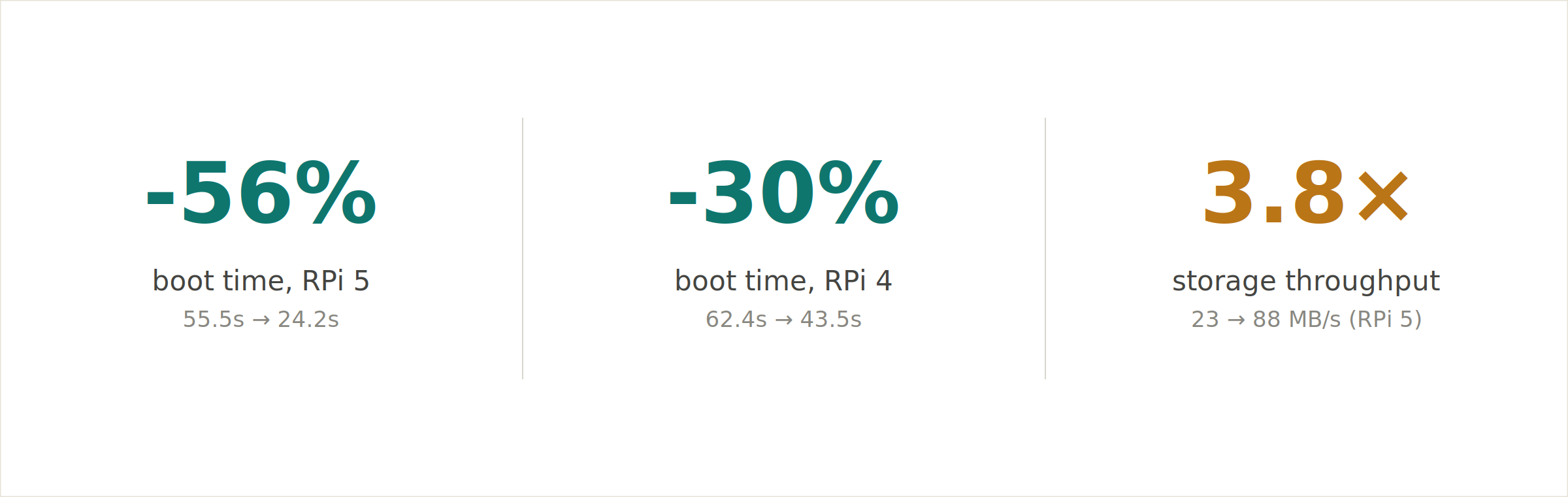
Our Android builds used to take about one minute to reach the home screen on Raspberry Pi 5, which has a quad-core Cortex-A76 at 2.4 GHz. By removing a single kernel parameter from the boot configuration we were able to cut that to 24 seconds, which is a 56% reduction. The Raspberry Pi 4 improved by 30% with the same change.
The cause was a kernel parameter we set deliberately years ago, during the original Android bring-up on Raspberry Pi 4 , to work around a stability problem on early hardware/software combination . We knew it came at a cost of limiting the SD card to roughly a quarter of its potential throughput on every single boot. back at the time, the tradeoff was worth it. Looking at it again last week, with newer hardware and a more mature platform, it no longer was.
Every phase was slow
Android instruments its own boot through a series of log events called boot_progress. Reading these timestamps after a cold boot breaks the total boot time into distinct phases:
-
Kernel handoff to userspace
-
Zygote preload
-
PackageManager scan
-
SystemServer start
-
First rendered UI frame
We saw on the Pi 5 that every single phase was slow, which indicated a specific problem: When every phase of an I/O-heavy process scales together, the system is storage-bound. The CPU was waiting on data the storage could not deliver fast enough.
Checking the SD card's operating mode confirmed it.# /sys/kernel/debug/mmc0/ios — before the fix on Raspberry Pi 5
clock: 50000000 Hzactual clock: 50000000 Hztiming spec: 2 (sd high-speed)signal voltage: 0 (3.30 V)bus width: 2 (4 bits)
The SD controller on the Raspberry Pi 5 supports UHS-I mode, which runs at 200 MHz, uses 1.8V signaling, and reaches sequential reads around 88 MB/s. The card was running at 50 MHz with 3.3V signaling, reaching 23 MB/s, about a quarter of what the hardware could do.
Problem with kernel cmdline flag
Every Raspberry Pi running Emteria's Android boots with a cmdline.txt that passes parameters to the kernel. One of those parameters was sdhci.debug_quirks2=4.
The value 0x4 corresponds to SDHCI_QUIRK2_NO_1_8_V, a flag that tells the SD host controller not to attempt 1.8V signaling at all. But UHS-I requires 1.8V to negotiate its higher-speed modes. With this flag present in the cmdline , the controller cannot leave the legacy High-Speed 50 MHz mode, no matter what the card or the silicon supports.
We set it during the original Pi 4 Android bring-up because of early timing issues at UHS speeds, and a board that does not boot reliably is a worse problem than a board that boots slowly. It was the right call at the time. It then carried forward unchanged into every Pi 4 and Pi 5 build we have shipped since, on every single device, because the cost was invisible unless you went looking for it, and the benefit it once protected against had quietly stopped mattering on newer hardware.
Noticeable speed-up after we removed it
The fix is this one keyword being removed from cmdline.txt. After reboot, the controller negotiates the highest UHS mode the card supports, at 1.8V.# /sys/kernel/debug/mmc0/ios — after the fix on Raspberry Pi 5
clock: 200000000 Hzactual clock: 200000000 Hztiming spec: 6 (sd uhs SDR104)signal voltage: 1 (1.80 V)bus width: 2 (4 bits)
The Pi 4 negotiated DDR50 at 44 MB/s. The Pi 5 reached SDR104 at 88 MB/s, a 3.8x throughput increase. Here is the full boot timeline, phase by phase:
| Milestone | RPi4 before | RPi4 after | RPi5 before | RPi5 after |
| boot_progress_start | 25.8 s | 19.9 s | 27.6 s | 14.4 s |
| Zygote preload done | 39.8 s | 28.2 s | 37.0 s | 17.5 s |
| PackageManager ready | 49.3 s | 35.3 s | 42.6 s | 19.7 s |
| ActivityManager ready | 52.8 s | 38.2 s | 47.4 s | 21.5 s |
| UI visible on screen | 62.4 s | 43.5 s | 55.5 s | 24.2 s |
It is important to note that these numbers are specific to the SD cards we tested. A card limited to SDR25 or DDR50 will negotiate a lower mode and see a proportionally smaller gain, since the improvement is tied to the highest mode the card itself supports.
Why the Raspberry Pi 5 improved more
Both boards used the same class of SD card and were capped by the same flag. Once it was removed, each negotiated the best mode its own controller could reach. The Pi 4's SD host controller tops out at DDR50, around 44 MB/s on this card. The Pi 5's bcm2712 controller completed the full SDR104 handshake at 200 MHz, reaching 88 MB/s. Same card, same flag removed, different ceiling in the silicon.
The evaluation showed that storage throughput improved 3.8x, but total boot time only improved 2.3x. If boot were purely limited by storage, those two numbers would match. They do not, and the gap is itself the useful data point: the phases that are heavy on reads (preload shrank roughly 3x, the PackageManager scan roughly 2x) moved close to the storage improvement, while the phases bound by CPU work and fixed initialization moved less. Boot on the Pi 5 is not storage-bound anymore. The remaining 24 seconds is firmware bring-up, dm-verity hashing, ART runtime initialization, and Android framework cold-start, costs that do not depend on how fast the card is.
Future optimization work
We are treating this blog as the first article in a short series rather than a one-off. Going back and re-checking decisions made years ago against today's hardware and today's Android platform led to the runtime optimization work we will cover next, including a result that transferred from Raspberry Pi to an NXP platform.
If you are building a product with Android, new releases for Pi 4 and Pi 5 with this fix are already available in our download section. If you are running into a different bottleneck on your own hardware, we would like to hear about it.
Build unique products, boost device performance
See why emteria is the chosen Android™ customization & management platform for OEM solution builders — and what it can do for your team and customers.

.png?height=230&name=blog-header(49).png)